Let’s break down a sample bill so you can better understand what each section means and what you need to do next.
Your billing statement can be accessed through MITPay by clicking “View Statement” on your account landing page. We recommend having it on hand so you can compare it to the examples below.
Starting with your first term bill, your monthly billing statements will have several sections showing your current:
- Charges
- Credits
- Net balance
What are charges and credits?
We refer to transactions on your bill as “charges” and “credits.”
Charges are amounts being subtracted from your account to pay for billed costs to MIT, such as tuition, fees, the MIT Student Health Insurance Plan (MIT SHIP)01 The <a href="https://mit.myahpcare.com/">MIT SHIP</a> charge always appears on your first term bill. If you <a href="https://sfs.mit.edu/help/faq/how-do-i-submit-a-health-insurance-waiver/">submit a waiver</a> by August 15, you will not need to pay for the MIT SHIP charge on your first term bill and the charge will be reversed on the following monthly bill. If your waiver is rejected, you must pay for the additional coverage on the following monthly bill. You must submit a waiver each year you wish to opt out of MIT SHIP. , on-campus undergraduate housing, dining, TechCASH, and any other expenses that you incur during the semester.
Credits are amounts being added to your account in order to pay for billed costs, and include funds such as your MIT Scholarship, outside scholarships, grants, and loans. Both anticipated (memoed) credits02 Financial aid funds that we expect to receive, but have not yet been received or applied to your account. and actual credits03 Financial aid funds that we have received and applied to your account. are subtracted from your total charges, reducing the balance of your bill.
Sample billing statement
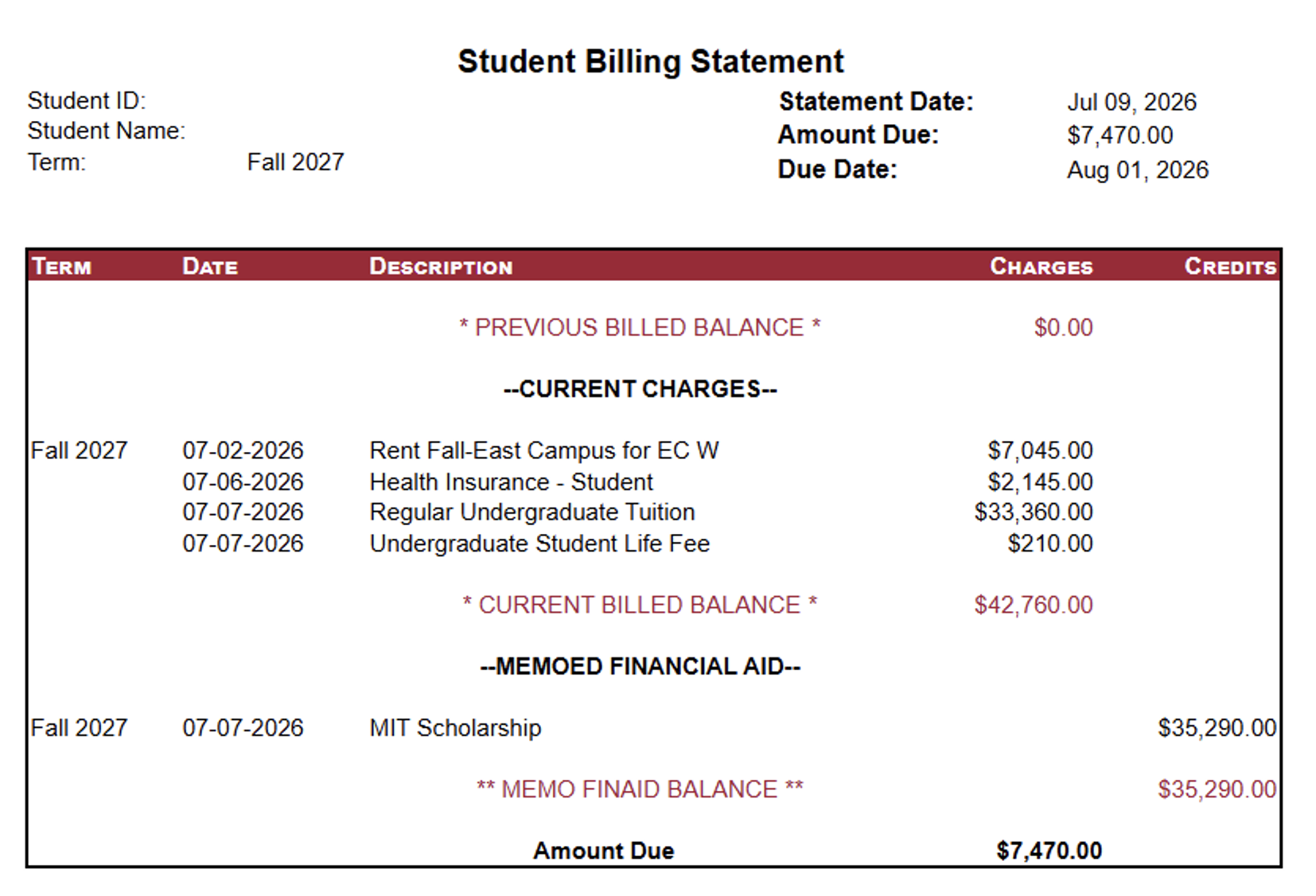
A sample billing statement showing: previous billed balance, current charges/current billed balance, memoed financial aid/memo finaid balance, and amount due.
Current Charges
All of your charges in the “CURRENT CHARGES” section are added up and displayed as your “CURRENT BILLED BALANCE.”
Note: The charges on your student account originate from different MIT departments. We are responsible for billing you for those charges, but if you need more information about a specific charge or need a charge adjusted, you must contact that department directly using the contact information included on your bill.
If you want to formally dispute a charge, you must contact customer service via email within 60 days of the date of the statement where the charge first appeared.
Memoed Financial Aid
Any anticipated credits are listed in the “MEMOED FINANCIAL AID” section, and are added up and displayed as your “MEMO FINAID BALANCE.”
If you are on the MIT Monthly Payment Plan, you will not see the plan amount reflected as anticipated credits; you will only see the payments applied to your bill after they have been officially paid.
Note: If we have not received your anticipated credits by the 15th day of the term, they are removed from your account balance. If this happens, you should contact customer service for next steps on how to receive the aid.
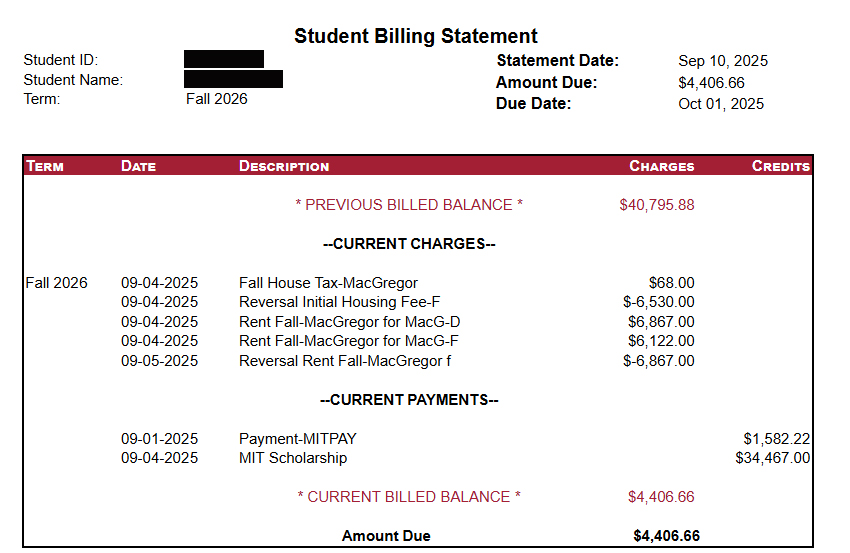
A sample billing statement showing a current payments section.
Current Payments
Once your anticipated credits (“memoed financial aid amount”) have officially been received, your actual credits will be displayed under “CURRENT PAYMENTS.”
If you are on the MIT Monthly Payment Plan, your payments will show up in this section after you have paid them.
Previous Billed Balance
Before your current charges and financial aid sections, you may see a “PREVIOUS BILLED BALANCE” line that shows any money that you either owe or are owed from previous bills: if you have an outstanding balance that you have not yet paid, it will appear under the “Charges” column, and if you have a credit on your account, it will appear under the “Credits” column.
Your previous billed balance amount will be applied to your current bill.
-
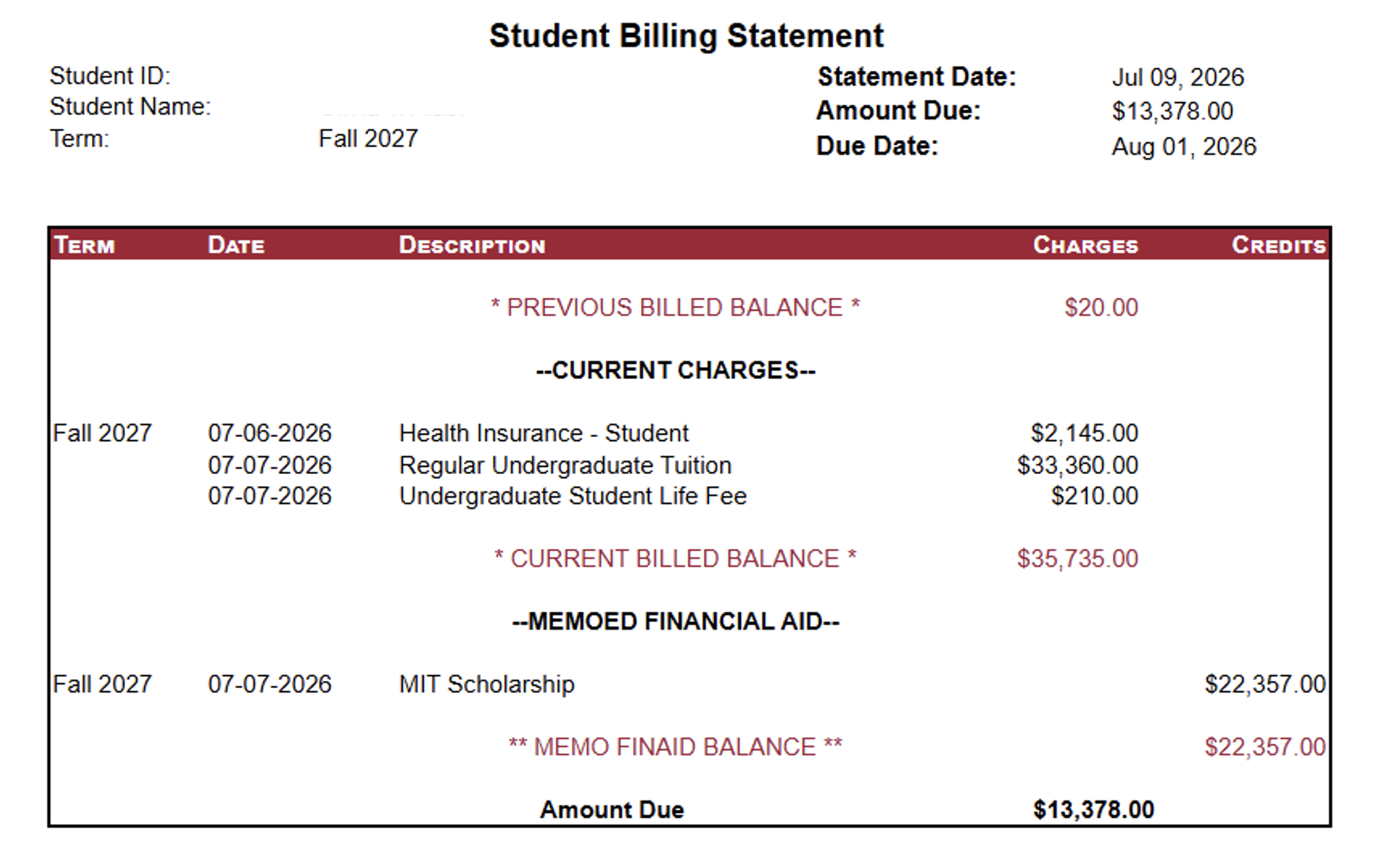
- Previous billed
-
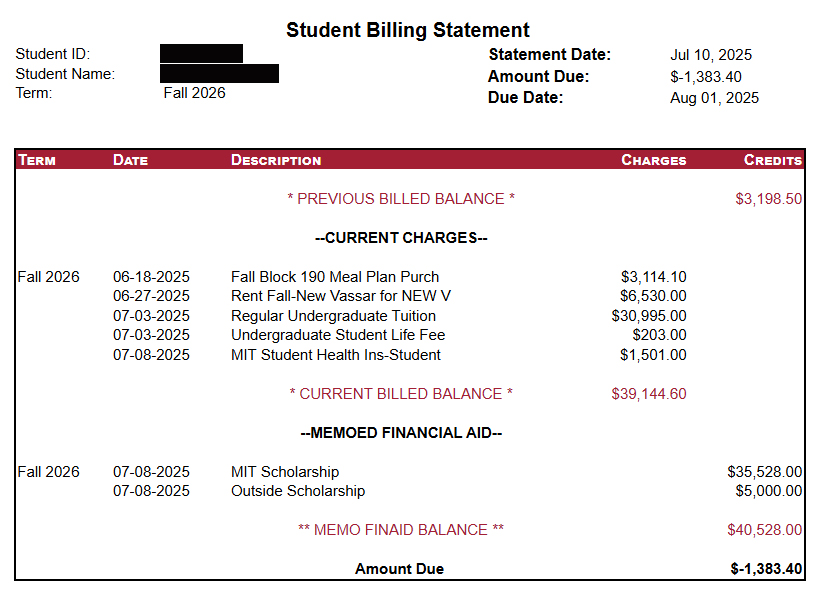
- Previous credit
Amount Due
Once your credits (“memoed financial aid” or “current payments”) and any previous billed balance are applied to your charges, the amount left over is your bill balance, displayed as your “AMOUNT DUE.”
If your bill balance is positive, it means that you owe money. You can pay off your balance using many different payment options.
If your bill balance is negative, it means that you have a credit on your account, either because you have overpaid or because your financial aid covers more than 100% of what you owe. With a credit, you have two options:
- You can take no action, and the credit will be applied to your next bill.
- You can request a refund, and have the credit sent to your bank account.
Questions?
If you have any questions about your billing statement, our customer service counselors are always available to help. Counselors are assigned by last name, and you can find yours on our contact page.
- The MIT SHIP charge always appears on your first term bill. If you submit a waiver by August 15, you will not need to pay for the MIT SHIP charge on your first term bill and the charge will be reversed on the following monthly bill. If your waiver is rejected, you must pay for the additional coverage on the following monthly bill. You must submit a waiver each year you wish to opt out of MIT SHIP. back to text ↑
- Financial aid funds that we expect to receive, but have not yet been received or applied to your account. back to text ↑
- Financial aid funds that we have received and applied to your account. back to text ↑